Android security has come a long way since the early days, thanks largely to Google’s broad suite of virus-busting tools, like Play Protect for apps, Safe Browsing for the web, and the Advanced Protection Program for Google accounts. However, malware can still infect devices from time to time, and the latest threat aims to infiltrate your bank account just before the holidays.
The threat
Dubbed Sturnus, this latest Android threat is a classic Trojan horse malware that bypasses Android’s security protections to gain access to a target device. Once inside, a hacker can spy on your conversations in popular chat apps — like Signal, Telegram, and WhatsApp — and even mimic your bank’s login screen to trick you into handing over your bank login and password.
What makes this malware especially tricky lies in its sophistication. Sturnus doesn’t break the encryption found in the popular apps listed above. Instead it exploits Android’s native accessibility features to view, detect, and record data shown on your screen. The malware even comes with uninstall protection, making it harder to remove from a device once infected.
Here are some things you can do to make sure your Android phone is protected from Sturnus.
How to know if your phone is infected with Sturnus
Sturnus is especially dangerous because it runs completely undetected. There’s currently no way to know for sure that the malware is installed on your device. It could be lurking in your phone right now!
But don’t panic just yet. You’re less likely to be infected if either of these apply to you:
First, Sturnus is only transmitted through downloading and installing an Android app (an APK file, also known as an Android Application Package) directly to your phone. More than that, the infected APK file has to come from a third-party source outside of the Google Play Store — either in an attachment sent through a spam message or via a third-party app store. In a statement provided to Android Authority, Google confirmed that all Android users who strictly download apps from the Google Play Store are safe:
Based on our current detection, no apps containing this malware are found on Google Play. Android users are automatically protected against known versions of this malware by Google Play Protect, which is on by default on Android devices with Google Play Services. Google Play Protect can warn users or block apps known to exhibit malicious behavior, even when those apps come from sources outside of Play.
Second, Sturnus has only been detected in devices based in South and Central Europe so far. Users in the United States aren’t under any direct threat right now, but this could change as we get further into the holidays.
How to prevent Sturnus from infecting your phone
Just to be safe, there are some things you can do to make sure your Android phone is protected from Sturnus or any other downloadable security threat.
Google Play Protect
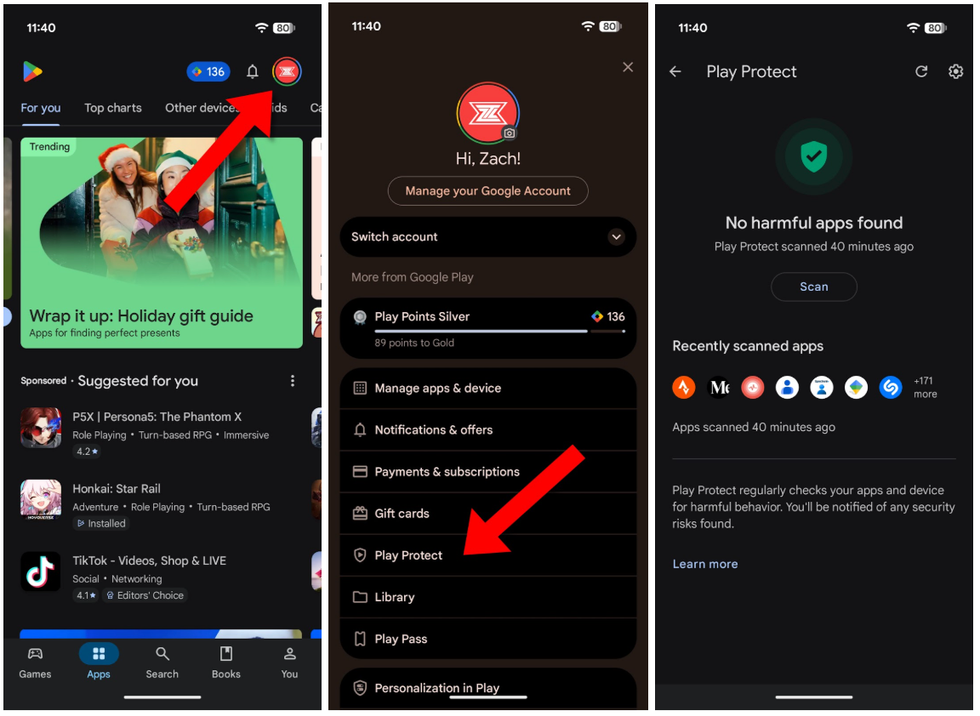
Make sure Google Play Protect is on. This feature regularly scans the apps downloaded to your phone and checks them for “harmful behavior,” including viruses and malware. To enable Play Protect, open the Google Play Store app on your phone, tap your profile picture in the top right corner, then Play Protect. Make sure it’s turned on.
 Screenshots by Zach Laidlaw
Disable ‘Install unknown apps’
The Google Play Store is the default app store found on most Android devices sold in the U.S. Although Android phones can download apps from other sources, most of them ship with this feature turned off by default. Still with Sturnus going around, it’s a good idea to check to make sure your phone can’t accidentally sideload an app from a dubious corner of the internet.
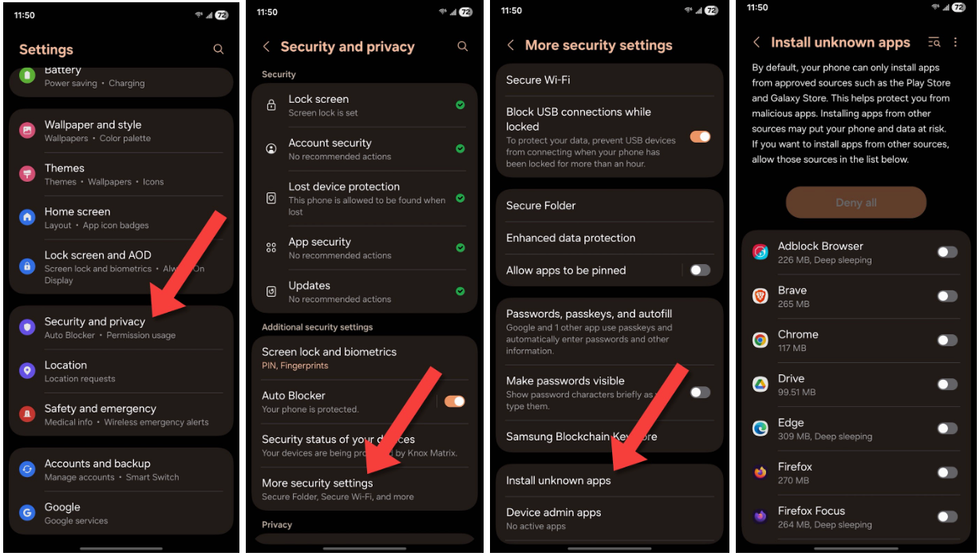
If you have a Samsung Galaxy phone, open the Settings app, tap on “Security and privacy,” then “More security settings,” and finally “Install unknown apps.” Make sure every app on this page is unchecked.
 Screenshots by Zach Laidlaw
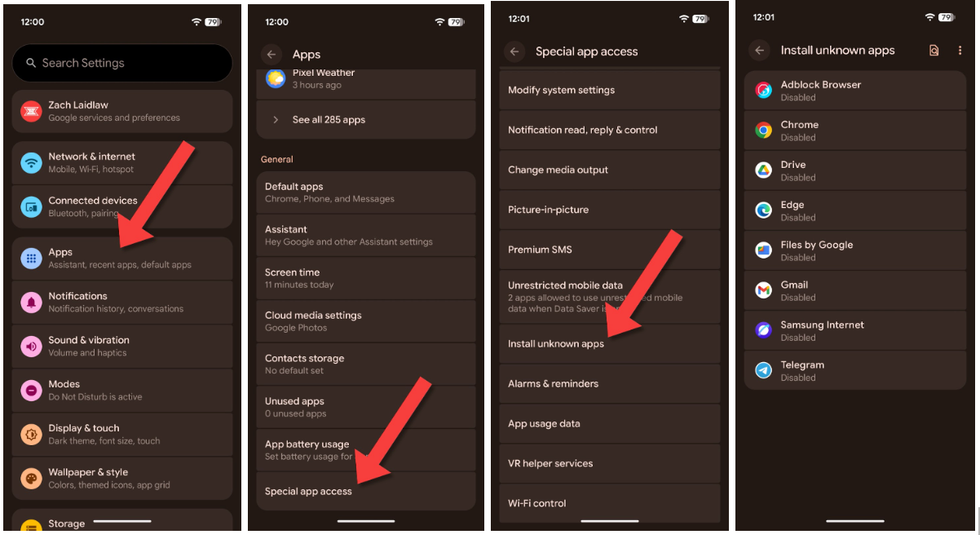
If you have a Google Pixel phone, open the Settings app, tap on “Apps,” then “Special app access,” and lastly “Install unknown apps.” As with Samsung, make sure every app on this page is disabled.
 Screenshots by Zach Laidlaw
For those with other-branded Androids, you should be able to find this feature by opening your Settings app and typing “install unknown apps” into the search bar. As with the devices above, make sure this feature is disabled.
Extra features
Depending on your device, some Android phones come with additional security features that protect against malware, both on the software side and the hardware side. For instance, Samsung Knox protects data and defends from cybersecurity threats. As for Pixels 6 and up, they come with a Titan M2 chip that makes it harder for hackers to access your phone if it’s stolen, plus regular monthly security updates directly from Google ensure that their phones are always up to date.
The fix?
At this time, there is currently no fix for Sturnus, and there isn’t likely to be one anytime soon. Since the malware exploits several important features baked directly into the Android operating system, Google would have to disable these features entirely to get rid of the problem, something that simply can’t be done.
RELATED: Cloudflare crash exposes the internet’s fragile core — and worse may be coming
 Photo by Jakub Porzycki/NurPhoto via Getty Images
With Sturnus on the rise, it’s probably not a coincidence that Google recently announced that it is making it more difficult to distribute and sideload unverified apps from third-party sources. The move would prevent this exact kind of malware from infecting devices worldwide, though backlash from avid Android users has caused Google to loosen these restrictions just a bit. The final version of the sideloading changes are expected to roll out starting in late 2026.
As for now, your best bet to keep Sturnus out of your phone is to stay away from APKs that come from anywhere outside of the Google Play Store. Do that one simple thing, and you have nothing to worry about.